
Dolphin Tool V1.2 - ADB Fastboot & MTK Servicing Tool [Free][2026]
Labels: MTK, UnlockTool, Tools, Samsung, Xiaomi
What is Dolphin Tool V1.2?
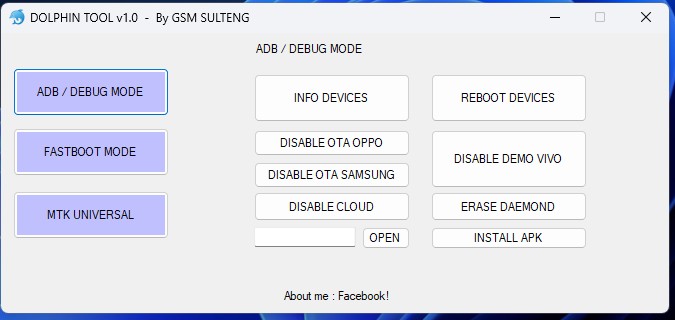
Dolphin Tool V1.2 is a lightweight Windows application used by mobile technicians to repair Android phones that power on but face various software glitches. It is specifically designed for technicians and allows them to determine the correct connection mode for a specific mobile device and activate that mode. The tool supports ADB, Fastboot, and MediaTek (MTK) boot modes.
The application is distributed as a 22 MB package compatible with Windows 7, 8, 10 and 11. The archive password for the download is tfttool, which is provided on the official source page. Dolphin Tool V1.2 is completely free to use and does not require any paid activation or license.
The tool works by detecting the correct USB communication mode for each connected device, which is essential for performing safe and reliable repair operations. Since most mobile devices connect via specific modes depending on the task, Dolphin Tool has become widely popular among technicians who need consistent and accurate mode switching during servicing workflows.
What's New in v1.2
Version 1.2 builds upon the original release with enhanced stability and expanded chipset support. The update focuses on improving the reliability of ADB and Fastboot operations across a wider range of popular Android brands.
- Improved ADB and Fastboot mode handling for better device communication.
- Enhanced MediaTek (MTK) device support for servicing operations.
- Refined interface for faster navigation during repair workflows.
- Added support for additional Android models across major brands.
Key Features
- ADB-related operations for device diagnostics and repair.
- Fastboot mode support for firmware and bootloader operations.
- MediaTek (MTK) device servicing capabilities.
- Recovery and bootloader mode access functions.
- Basic phone information viewing and device communication.
Supported Devices
Dolphin Tool V1.2 supports most Android brands including Samsung, Xiaomi, Redmi, POCO, OPPO, Vivo, Realme, Infinix, Tecno, itel, Motorola and Huawei. Since the tool operates across ADB, Fastboot and MTK modes, it can be used on a wide variety of smartphones and tablets from these manufacturers.
How to Use
- Download the Dolphin Tool V1.2 archive from the official source (password: tfttool).
- Extract the ZIP file to a folder on your Windows PC using WinRAR or 7-Zip.
- Enable USB debugging on your Android device before connecting.
- Run the tool as administrator and connect the device via USB cable.
- Select the appropriate boot mode (ADB, Fastboot or MTK) and required operation.
- Follow the on-screen instructions to complete the servicing process.
System Requirements
- Windows 7, 8, 10 or 11 (32-bit or 64-bit).
- At least 1 GHz processor and 1 GB RAM recommended.
- USB drivers for the target Android device installed on the PC.
- Original or high-quality USB data cable.
- Administrator rights to run the application.
Notes
- Always back up important data before performing any repair or reset operation.
- Verify the archive password and file integrity after downloading from the source.
- Ensure USB debugging is enabled and the device battery is sufficiently charged.
- Use only the official download source to avoid modified or untrusted builds.
- The 22 MB package is lightweight and installs quickly on most Windows systems.
Download Link
Download Dolphin Tool V1.2 from the official source: tfttool.com/dolphin-tool-v1-2 — Archive password: tfttool
The package is available only through the official TFT tool website. Always avoid third-party mirrors that may distribute modified or tampered files.
Thanks for reading: Dolphin Tool V1.2 - ADB Fastboot & MTK Servicing Tool [Free][2026], Sorry, my English is bad:)