
What is Google Pixel Technicians Toolkit?
Google Pixel Technicians Toolkit is a specialized free Windows utility designed for Google Pixel device management, firmware flashing, and advanced repair operations. Developed by the GSM6 team and published on GitHub, the toolkit consolidates essential Pixel servicing functions — ADB and Fastboot operations, firmware flashing, bootloader management, and device configuration — into a single user-friendly interface. It is aimed at mobile technicians and advanced users who work with Pixel devices regularly.
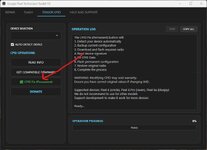
The latest version is V3.8.04.2026, released in August 2026, building on the V3 series which introduced permanent IMEI repair, Android 16 support, and one-click operations that set a new standard for Pixel servicing tools.
What is New in V3.8.04.2026
This update adds several important improvements to the V3 series:
- One-Click Root using same build: The toolkit now supports one-click rooting using the same build installed, streamlining a process that previously required manual command execution
- Pixel 6 Pro — Saving Configurations Fixed: An issue where Pixel 6 Pro configurations would not save properly has been resolved
- Signature Verification for 2026 Builds Fixed: Resolved signature verification errors that were occurring on newer 2026 firmware builds
- Improved Token Verification System: The daily token system that protects the free toolkit from abuse has been improved for better reliability and smoother daily activation
Features
Permanent IMEI 0 Fix
One of the most important features of the Toolkit V3 series is the permanent IMEI 0 fix for Pixel 6, Pixel 6a, and Pixel 6 Pro. Many of these devices developed the notorious IMEI 0 issue where the IMEI would revert to zero after OTA updates, losing network connectivity. Unlike temporary fixes, this solution survives OTA updates, factory resets, and full firmware reflashes — making it a permanent repair.
Device Information
Read detailed device information including model name, Android version, build number, battery status, and more from a single dashboard view. The toolkit connects via ADB to pull accurate information directly from the device.
Firmware Flashing
- Flash complete factory firmware packages directly from the toolkit interface
- OTA sideload support for incremental updates
- Flash custom partition images (boot, system, vendor)
- Automatic bootloader status checking before flashing
- Detect active slot before flashing on Pixel 6 and newer (A/B slot devices)
Bootloader Management
- Lock or unlock bootloader with one click
- Switch between A/B slots on supported devices
- Boot to recovery, bootloader, or fastbootd modes
- Professional servicing workflow with safety checks
ADB & Fastboot Operations
- Screenshot capture via ADB
- APK installation from the PC
- Logcat viewer for diagnostic purposes
- Reboot to recovery, bootloader, system, or power off
- Emergency stop functionality to halt operations mid-flash
Advanced Configuration
- Real-time operation logs during all processes
- Device connection verification before any operation
- Battery level checking to prevent issues during flash operations
- Configuration saving and loading for repeated operations
Version History
- V3.8.04.2026 (Current) — One-click root, Pixel 6 Pro config fix, improved token system
- V3.6.01.2026 — Detect active slot before flash, signature verification fix
- V3.5.31.2026 — Token display system fix
- V3.4.22.2026 — Various improvements
- V3.4.14.2026 — Various improvements
- V3.4.07.2026 — Various improvements
- V3.4.06.2026 — Permanent IMEI 0 fix (survives OTA and reflashes), Android 16 support, Android 17 Beta support, no firmware downgrade required
- V3.3.29.2026 — Quick ADB/Fastboot functions, firmware flasher, manual IMEI fix for Pixel 6 series
How to Install and Use
- Download the toolkit from the official GitHub releases page (gsm6official/GooglePixelTechniciansToolkit) or the official GSM6 page
- Download the latest version: GooglePixelTechniciansToolkitV3.8.04.2026_Setup.exe
- Run the installer as Administrator on your Windows PC
- Launch the toolkit from desktop or Start Menu
- Connect your Google Pixel device via USB with USB debugging enabled
- Obtain the daily activation token from the official page and paste it into the toolkit
- Click Verify — the toolkit is now active and ready to use
System Requirements
- Operating System: Windows 10 or Windows 11
- Processor: Intel Core i3 or equivalent
- RAM: 4 GB minimum
- ADB and USB drivers installed on the PC
- Internet connection (for daily token verification only)
- Google Pixel device (Pixel 6 series and newer recommended)
Important Notes
- The toolkit is completely free — you only need to obtain the daily activation token from the official page each day (refreshes at 00:00 UTC)
- The daily token system protects the toolkit from unauthorized automated use while keeping it free for legitimate technicians
- The permanent IMEI 0 fix works on Pixel 6, Pixel 6a, and Pixel 6 Pro and survives all software operations including OTA updates
- Do not interrupt the flashing process — always ensure stable power and USB connection during firmware operations
- Unlocking the bootloader will erase all data on the device — always create a backup first
- The toolkit requires an internet connection only once per day for token verification; offline use is supported after that
Download Link
Download Google Pixel Technicians Toolkit V3.8.04.2026:
- Official GitHub: github.com/gsm6official/GooglePixelTechniciansToolkit/releases
- Official Site: gsm6.com
File: GooglePixelTechniciansToolkitV3.8.04.2026_Setup.exe (~24 MB)
SHA-256: ff28052470858c5201304b1ea7f2326a58ac7ebc827fe78fcd84d82d0b660087
Thanks for reading: Google Pixel Technicians Toolkit V3.8.04.2026 - Free Pixel Servicing Tool [2026], Sorry, my English is bad:)