
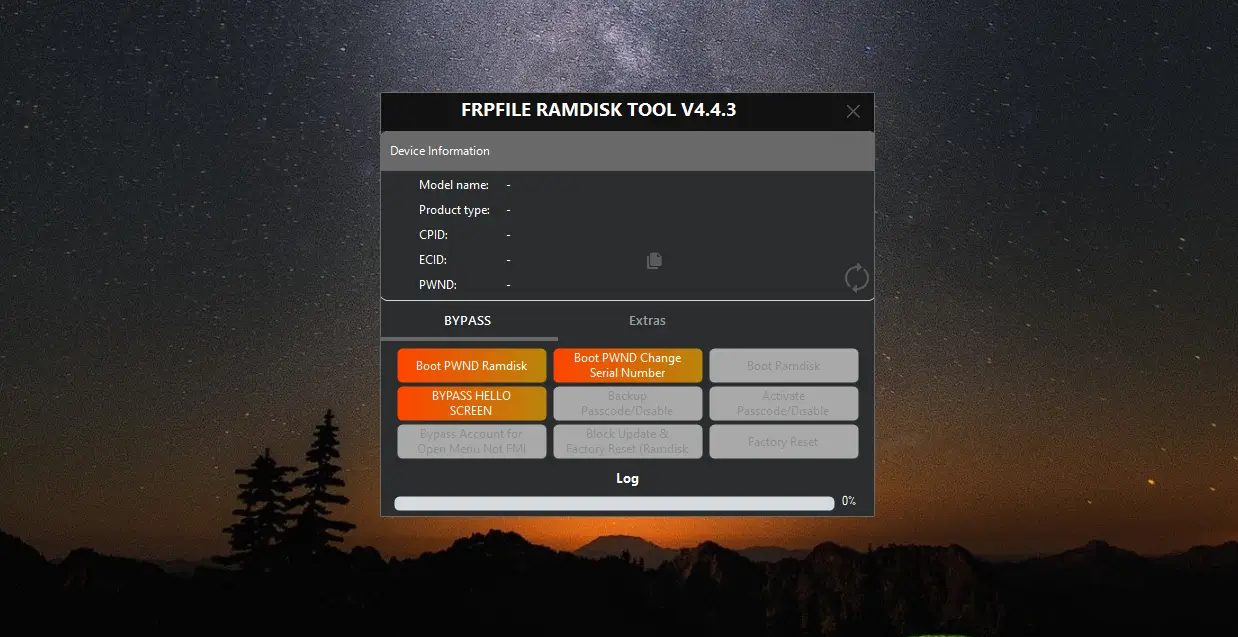

> FRPFILE RAMDISK Tool v4.4.3 is a Windows and Mac utility from the FRP FILE team that bypasses the passcode/disabled lock (with working signal) and the iCloud activation lock / Hello screen (without signal) on older iPhones and iPads, with no jailbreak required.
What is FRPFILE RAMDISK Tool?
It is an iOS service tool that works by booting a custom RAM disk on checkm8-supported devices. Because it does not depend on a jailbreak, it can fix passcode-locked or disabled devices while keeping the baseband alive, so calls, mobile data and iCloud services continue working after the passcode bypass. The same RAM disk approach also handles the Hello screen / activation lock on supported models.
Features
- Bypass passcode and disabled lock on iOS 11-17.x with signal, calls, data, iCloud services and notifications.
- Untethered Hello screen bypass (no signal) for iOS 15-17.x when the baseband is broken.
- Factory reset and remove screen time functions.
- Read account and phone number from the device.
- No jailbreak needed for the core workflow.
- Separate boot files provided for iOS 11 up to 16.4-17.
Supported Devices
iPhone 6, 6 Plus, SE, 6s, 6s Plus, 7, 7 Plus, 8, 8 Plus and iPhone X. iPad support covers iPad Air 2, iPad Mini 4, iPad 5/6/7 and iPad Pro 9.7 / 10.5 / 12.9 (2nd gen and related A-numbers).
How to Use
- Download the tool and the matching RAM disk boot file, then install Apple USB drivers.
- Put the device into DFU mode and connect it to the PC.
- Click Boot PWND Ramdisk and wait for the device to be pwnd.
- Click Boot Ramdisk to load the custom file.
- Backup Passcode to save the activation data from the device.
- Run Factory Reset, then boot the RAM disk again.
- Use Activate Passcode / the bypass option and reboot.
System Requirements
- Windows (64-bit) or macOS.
- Microsoft .NET Framework 4.7.2 (Windows).
- Apple Mobile Device USB driver.
- DFU-capable iPhone/iPad and a good USB cable.
FAQ
Is FRPFILE RAMDISK free? The tool is provided by the FRP FILE team, but every device uses a paid ECID registration before activation.
Will calls and data keep working? Yes, the passcode bypass keeps the baseband alive, so signal, calls and iCloud services work.
Do I need to change the serial number? Only certain WiFi-only iPad jobs require a serial change.
Which boot file do I need? Match the boot file to the device iOS: files are provided for iOS 11 up to 16.4-17 and are copied to the FRPFILE RAM disk folder before starting.
Notes
Replace serial numbers only for setups that require them. Register your device ECID with the official reseller before use and keep the tool updated. The unzip password for the official package is "frpfile". Unplugging mid-process can leave the device in a partial state, so always complete each step. The price per device is paid via ECID registration, which the reseller enables before the tool will activate a unit, and the official team recommends Virus-total scanning of downloaded packages.
Download Link
Download FRPFILE RAMDISK v4.4.3 (Windows & Mac). Official source: frpfile.com/download.
Thanks for reading: FRPFILE RAMDISK Tool v4.4.3 – Bypass Passcode, Disable & Hello Screen (iOS 11–17), Sorry, my English is bad:)