
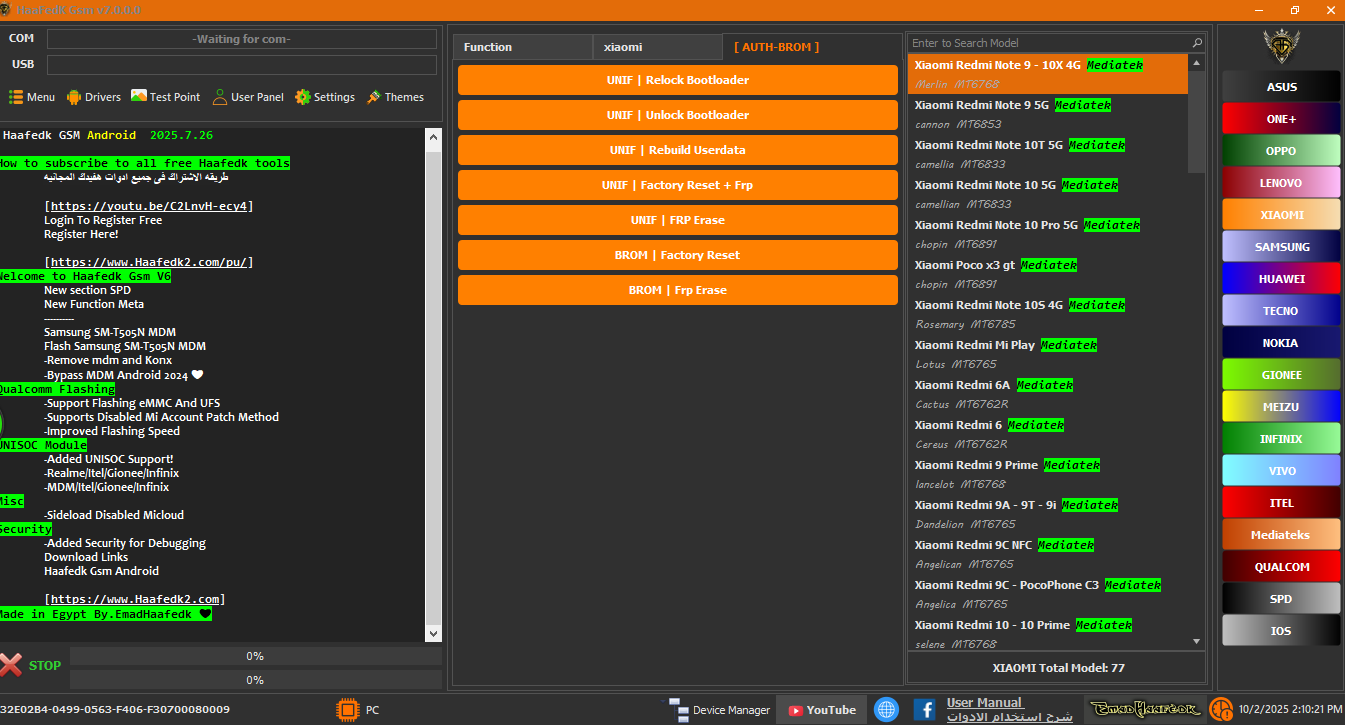

> Haafedk GSM Tool V7.0.0 is the latest free all-in-one mobile repair program from the Haafedk team. It packs iCloud bypass, FRP unlock, IMEI repair, flashing and network fix into a single Windows application that works with iPhone, iPad, Samsung, Xiaomi, Oppo, Vivo, Huawei and MTK/Qualcomm devices.
What is Haafedk GSM Tool?
Haafedk GSM Tool is a free multi-brand service tool designed for phone technicians and GSM software users. Instead of installing a separate program for every brand, you handle the most common repair jobs from one dashboard: unlocking FRP, restoring iCloud activation, rewriting IMEI, fixing network problems and flashing firmware. Version 7.0.0 keeps this classic all-in-one approach while making the tool faster and adding newer device support.
What's New in V7.0.0
- Member panel is integrated directly into the tool for easier account management.
- New SPD section for Spreadtrum (Unisoc) chipsets.
- Meta Samsung SM-T505N MDM Flash and MDM remove / Knox bypass options.
- Improved Qualcomm flashing, including eMMC and UFS storage support.
- Disabled Mi Account patch method added for Xiaomi.
- Faster flashing engine and better overall compatibility.
Features
- iCloud bypass and FMI OFF for Apple devices.
- FRP unlock for Samsung, Xiaomi, Oppo, Vivo and more.
- IMEI repair and network / signal fix.
- Flashing and firmware management for MTK, Qualcomm and Unisoc.
- MDM remove and Knox bypass.
- Hardware and Read Info tools for diagnosis.
Supported Devices
iPhone and iPad (iCloud functions), Samsung Galaxy series (FRP, MDM, Knox), Xiaomi Redmi and Mi devices (FRP, Mi account), Oppo, Vivo, Huawei, and phones powered by MediaTek, Qualcomm and Unisoc chipsets.
How to Use
- Download the tool from the official Haafedk site and install it.
- Register your free serial on the Haafedk server so activation works.
- Install the proper USB drivers for the phone brand.
- Connect the device and select the job (FRP, iCloud, IMEI, Flash).
- Follow the on-screen steps and wait for the operation to finish.
System Requirements
- Windows 7 / 8 / 10 / 11 (64-bit recommended).
- NET Framework 4.7.2 or newer.
- USB drivers for the supported chipsets.
- Internet connection for the first activation.
FAQ
Is Haafedk GSM Tool free? Yes, the tool itself is given away free for technicians and end users.
Does it need a box or dongle? No, it runs on a normal PC without extra hardware.
Why do I need to register a serial? Activation binds the tool to your machine so the free license can be verified.
What version is available? V7.0.0 is the verified release matching the official site; a newer V7.2.0 build is already circulating on community pages and brings extra device support.
Notes
Only download from the official Haafedk site to avoid modified builds. Take a backup before flashing or IMEI jobs. The free tool covers stock features; some advanced jobs may need a paid account on the official server.
Download Link
Download Haafedk GSM Tool V7.0.0 from the official Haafedk downloads page.
Thanks for reading: Haafedk GSM Tool V7.0.0 – Free All-in-One GSM, FRP & iCloud Repair Tool, Sorry, my English is bad:)