
KS Tool V4.3 - Free Qualcomm & MTK FRP Unlock and Flashing Utility [Free][2026]
Labels: UnlockTool
KS Tool V4.3 is a free Windows servicing utility for Qualcomm, MediaTek and HiSilicon/Kirin phones, built around one dashboard for FRP removal, Mi Account bypass, bootloader unlock, firmware flashing and NV repair. It ships with a free offline login (username "KS Tool", password 12345) so you do not need a dongle or an annual activation, and the 4.3 build targets Android 15 and Android 16 security levels. For a shop that handles a mix of Xiaomi, Oppo, Vivo and Realme devices, it removes the need to jump between four or five separate programs.

What is KS Tool?
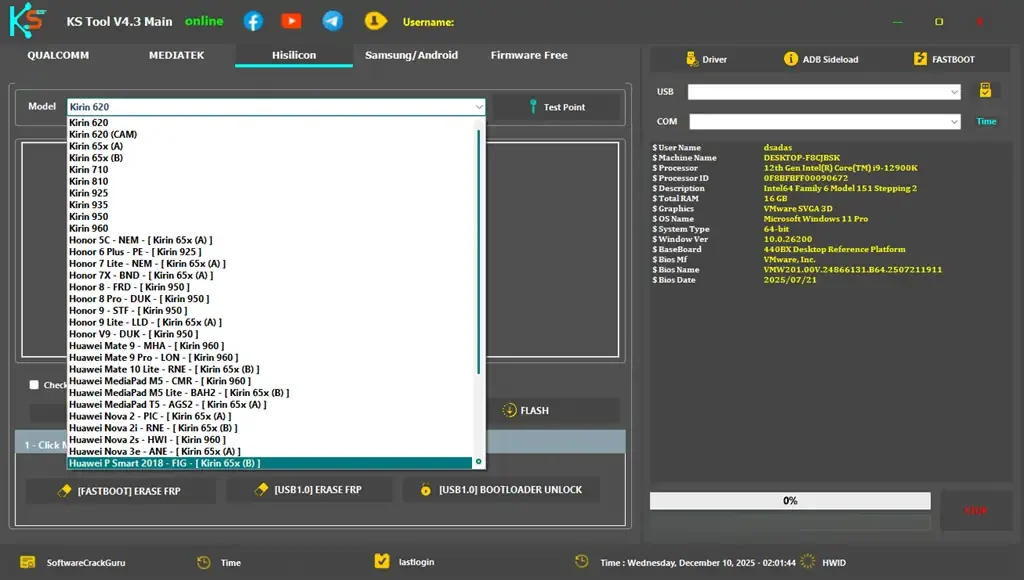
KS Tool is a chipset-oriented Android service program. The interface is split into four working areas - Qualcomm, MediaTek, Samsung/Android and HiSilicon - and each area exposes the operations that suit that platform, from EDL 9008 flashing to test-point entry and partition reading. Everything runs locally on Windows and does not require a paid credits system, which is why it keeps showing up in technician threads next to much more expensive box software.
The Qualcomm module handles FRP erase, factory reset, Mi Account disable, bootloader unlocking, EDL firmware flashing, partition read/write and NV backup, restore or erase. The MediaTek module adds the MTK-specific tools: scatter-based flashing, auth bypass so you can flash without an authorised account, IMEI repair for null or invalid IMEI, bootloader unlock and relock, partition management and the well-known fix for the Oppo "Download Not Complete" error.
The tool is also not limited to EDL and BROM modes. It includes Samsung MTP operations - read info, enable ADB for FRP removal, open the browser directly on the phone, factory reset and jump into download mode - plus general Fastboot and ADB commands such as fixing "System is Destroyed", repairing DM-Verity, rebooting to EDL and disabling OTA updates so the phone does not re-lock after a repair.
What's New in V4.3
- Offline login that works completely free, with no dongle and no credit purchase.
- Support for Android 15 and Android 16 security levels across Qualcomm and MTK.
- Added Huawei Kirin / HiSilicon functions, including FRP unlock and Huawei ID removal on Kirin CPUs.
- Expanded Samsung MTP toolkit: MTP info, factory reset, ADB FRP and download-mode entry.
- Improved unauthenticated flashing for newer Qualcomm and MTK chipsets (auth bypass).
- Stability and device-detection improvements plus fixes for the Oppo download error.
Key Features
- Qualcomm: erase FRP (Google lock), factory reset, disable Mi Account, unlock bootloader, flash firmware, read/write partitions, backup-restore-erase NV, reboot to EDL from Fastboot.
- MediaTek: erase FRP, format and screen-lock removal, scatter flashing, auth bypass, IMEI repair, bootloader unlock/relock and Oppo download fix.
- HiSilicon/Kirin: test-point entry, update.app flashing, check-all and erase, FRP erase, fastboot erase, USB 1.0 bootloader unlock and Kirin unlock mode.
- Samsung and general Android: MTP info, enable ADB, open YouTube or Maps in MTP mode, factory reset, enter download mode, disable OTA updates.
- Fastboot and ADB utilities for reading info, erasing FRP, flashing, fixing DM-Verity and system-destroyed errors.
- Custom loader support, auto-reboot option, test-point buttons and one-click modes in a single organised dashboard.
- Free license for unlimited use, with no credits consumed per operation.
Supported Devices
Qualcomm coverage in 4.3 spans Xiaomi, Redmi and POCO (Mi 11/12 series, Redmi Note 10 through 13, POCO F/X and K20-K40), Vivo and iQOO, Oppo, Realme, Tecno, Infinix, Itel and Huawei models that use Snapdragon silicon. Typical jobs are FRP erasure on 9008 on models where a simple fastboot erase is blocked by newer security patches.
On the MediaTek side the list includes the Redmi Note 8 Pro, Note 9/10/11/12, POCO C and M series, Redmi 9/10/12, Oppo A-series and Reno MTK variants, Vivo Y and V-series, Realme C and Narzo, and Tecno/Infinix/Itel devices with MT67xx and MT68xx chips. Samsung support in this version is focused on MTP-mode operations rather than full Odin-style flashing, and Qualcomm-based Samsung models such as A01, A02s, A11, A20s, A52, A70, A71 5G, J4+, J6+, M01, M02s and the MTK A10s are specifically listed.
Kirin support extends the tool to Huawei devices that most free utilities ignore, letting you remove FRP and Huawei ID through test-point entry. As always with multi-brand utilities, the practical coverage depends on the loader you supply and on the exact firmware version on the phone - a model that is "supported" can still fail if its security patch is newer than the tool build.
How to Use
- Download the KS Tool archive, then temporarily disable your antivirus - these utilities are frequently flagged as false positives during extraction.
- Extract the files to your C: drive exactly as instructed, since the tool expects to run from a short path.
- Open the extracted folder and run the included driver installer to set up the Qualcomm and MediaTek USB drivers in one click.
- Run the setup file if your package includes one, then launch the desktop shortcut named "KS Tool Online 1.exe".
- Log in with the free credentials: username "KS Tool" and password 12345; leave the other fields empty.
- Choose the chipset tab for your device, connect the phone in the correct mode (EDL 9008, BROM, Fastboot, ADB or MTP) and let the tool detect it.
- Select the operation - erase FRP, factory reset, flash firmware or read info - and wait for the log to report completion before unplugging.
Requirements
- Windows 7, 8, 8.1, 10 or 11 (32-bit and 64-bit builds are used in practice).
- About 1 GB of free disk space for the archive and roughly 2 GB extracted.
- Qualcomm and MediaTek USB drivers, installed by the tool's own one-click driver installer.
- A quality USB data cable and, for some models, a test point short to enter EDL or BROM mode.
- Antivirus excluded or disabled during extraction and first run.
- Firmware or a custom loader for your model if you plan to flash; the tool does not ship stock ROMs.
- Administrator rights to install drivers and set up the tool folder.
Download Link
The offline-login 4.3 package is mirrored at TFT Unlocker, which lists the file as KS_Tool_V4.3.7z (about 914 MB compressed) and publishes the same free credentials: https://tftunlocker.com/ks-tool-v4-3/
A second mirror with the same release notes and file details is available at https://www.mobileteamofficials.com/2025/11/ks-tool-42-free-download-2025.html, and the upstream page with Mega and backup links is http://www.romgsm.net/2025/11/ks-tool-v4.3-free.html.
Note: some users report the "user is banned" message and wrong-archive-password complaints on older re-uploads. If the login fails, you are probably running a stale build - use the 4.3 release rather than a 4.1 or 4.2 repack, and always verify the archive password before extracting.
Thanks for reading: KS Tool V4.3 - Free Qualcomm & MTK FRP Unlock and Flashing Utility [Free][2026], Sorry, my English is bad:)