
TP ISP Pinout Tool V1.5 - Test Point & ISP Pinout Selector for Android Repair [Free][2026]
Labels: freeTool
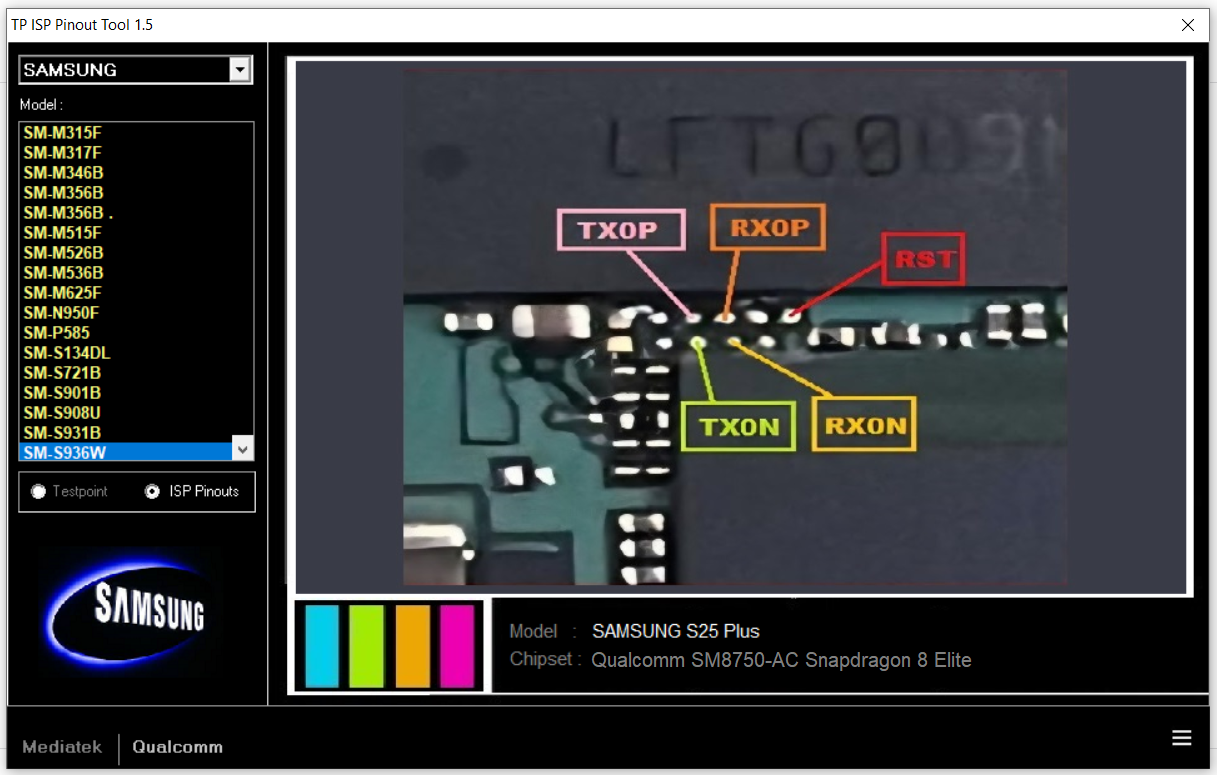
TP ISP Pinout Tool V1.5 is a free Windows utility that shows the exact Test Point (TP) and ISP pinout locations on real smartphone motherboard photos, so technicians can find EDL and eMMC/UFS points in seconds instead of hunting through forum threads. The 1.5 line packs more than 1000 real PCB images covering MediaTek and Qualcomm platforms, with a model search, a built-in magnifier and direct switching between TP and ISP views. It is one of the few hardware-reference tools that stays completely free, needs no login and works offline.

What is TP ISP Pinout Tool?
TP ISP Pinout Tool is a pinout selector for mobile repair work. Instead of digging through screenshots posted on forums, you pick a processor family, then a brand and a model, and the tool displays the matching motherboard picture with the Test Point and ISP contacts highlighted. The point of the whole program is speed and accuracy: a dead phone that is not detected by the PC is useless until you can short the correct TP, and a wrong point on a live board can cost you the device.
The database is organised in two main tabs. The MediaTek tab covers common MTK brands such as Tecno, Infinix, Itel, Oppo, Realme, Vivo, Huawei, Lenovo, ZTE and Doogee. The Qualcomm tab covers the QLM and "others" group: Xiaomi, Samsung, Vivo, Oppo, Realme, Nokia, LG, Sony, HTC, Coolpad and more. Every entry is a real PCB photograph, not a drawing, which matters because board revisions often move the pads around.
Version 1.5 is a large content and usability upgrade rather than a cosmetic one. It added support for eMMC and UFS ISP work, a case-insensitive model search, right-click options directly on the PCB image, and a magnifier that helps when the points sit under a shield or between tiny components. It also ships an off-screen GUI capture so you can save a board picture as a BMP and mark it up for your own bench notes.
What's New in V1.5
- More than 1000 real PCB pictures added for TP and ISP pinout references.
- New eMMC and UFS ISP pinout support for memory-level repairs.
- Direct switching between TP pinouts and ISP pinouts without leaving the screen.
- Search by model option (hidden by default) plus a case-insensitive search build in 1.5.1.
- Right-click popup menu on any PCB photo for quick actions.
- Version 1.5.1 added Alcatel TP (6 models), Coolpad TP (2), Infinix TP (16), Oppo TP/ISP (14), Realme TP/ISP (26), Samsung TP/ISP (22) and Vivo TP/ISP (46).
Key Features
- Real motherboard (PCB) photos instead of generic schematic drawings, so the points match what you actually see on the bench.
- Model and chipset name displayed on screen, with the previously missing chipset names fixed in 1.5.
- Magnifier with adjustable form size 1, 2 and 3 for very small pads.
- Animated gold markers on selected PCBs; blinking can be disabled from the right-click menu ("Blink EDL Points").
- GUI capture to save any PCB image as a BMP file for documentation or client reports.
- Model alias notices - an exclamation icon warns when an alternative device name may use a different TP location.
- Window size selection, scrolling-text toggle and a clean offline interface with no account needed.
Supported Devices
On the MediaTek side the tool covers Alcatel, Condor, Doogee, Huawei, Iris Sat, Infinix, Itel, Lenovo, Logicom, Oppo, QMobile, Realme, Samsung clones, Tecno, Wiko and ZTE. Practically every budget MTK phone that lands on a repair desk in the region has at least one reference image in that tab, which is where the tool earns its keep for Infinix and Tecno FRP work.
On the Qualcomm side the coverage list includes Asus, Coolpad, HTC, Huawei, Infinix, Itel, LG, Nokia, Oppo, Realme, Samsung, Smartisan, Sony, Vivo and Xiaomi. Vivo and Realme are especially well represented after the 1.5.1 batch, with 46 and 26 new TP/ISP entries respectively. Samsung entries cover both TP and ISP references, useful when a model needs ISP work instead of a plain test point.
Because the database is image-based, coverage is model-specific rather than "all phones". Always check that the model number written on the board or in the settings matches the entry you opened, and use the alias warning if a regional name differs. For boards that are not in the list yet, treat the closest match as a hint only and confirm on a schematic before shorting anything.
How to Use
- Download the RAR package and extract it to a folder on your PC, or install it if the build you have uses a setup file.
- Uninstall any older version first - the developer recommends a clean install so the data folder is rebuilt correctly.
- Open the tool and choose the processor tab: MediaTek for MTK boards, Qualcomm for Snapdragon and the "others" group.
- Select the brand, then the exact model. Enable the search box from the right-click menu if you prefer typing the model number.
- Switch between TP and ISP pinout views depending on whether you need EDL mode or eMMC/UFS access.
- Turn on the magnifier and pick form size 1, 2 or 3 to see small pads clearly before you start shorting.
- Right-click the photo if you want to save it as BMP with GUI Capture, or to stop the blinking gold points.
Requirements
- Windows 10 or Windows 11, 32-bit or 64-bit.
- Around 250 MB of free disk space for the extracted database (the 1.5.1 package is about 243 MB).
- A RAR extractor such as WinRAR or 7-Zip - the official file is distributed as TP_ISP_Pinout_Tool_1.5.1.rar.
- No internet connection required; the pinout database is local.
- Basic bench equipment: fine tweezers or a wire for shorting points, plus the USB cable used by your flashing tool.
- Administrator rights are not strictly needed, but antivirus exclusions may be required so the data folder is not quarantined.
- A second screen or the BMP capture feature is handy for comparing the board with the reference image while you work.
Download Link
The tool is freeware and Softpedia carries the current 1.5.1 build as TP_ISP_Pinout_Tool_1.5.1.rar, which is the cleanest source to use: https://www.softpedia.com/get/Mobile-Phone-Tools/Others/Testpoint-Pinout-Tool.shtml
A mirror hosted by the original maintainer network is available at https://gsmsud.com/tp-isp-pinout-tool/ and a Mega mirror is linked from the release post at http://www.romgsm.net/2026/01/tp-isp-pinout-tool-v15.html.
Note: the archive has no password. Always scan downloaded files and avoid re-uploads from unknown pages, because modified builds of hardware-reference tools are the classic vector for bundled miners or stealers.
Thanks for reading: TP ISP Pinout Tool V1.5 - Test Point & ISP Pinout Selector for Android Repair [Free][2026], Sorry, my English is bad:)