
UnlockTool 2026.09.02.0 - Apple A12/A13 Hello Fix & Multi-Brand Android Service [Update][2026]
Labels: UnlockTool
UnlockTool 2026.09.02.0 was released on 2 September 2026 as a maintenance update for the well known multi-brand servicing platform. The headline change is a fixed one-click Bypass Hello solution for Apple A12 and A13 devices, alongside the usual Android device additions and stability work. The Windows client is a 230 MB package developed by UnlockTool.net.
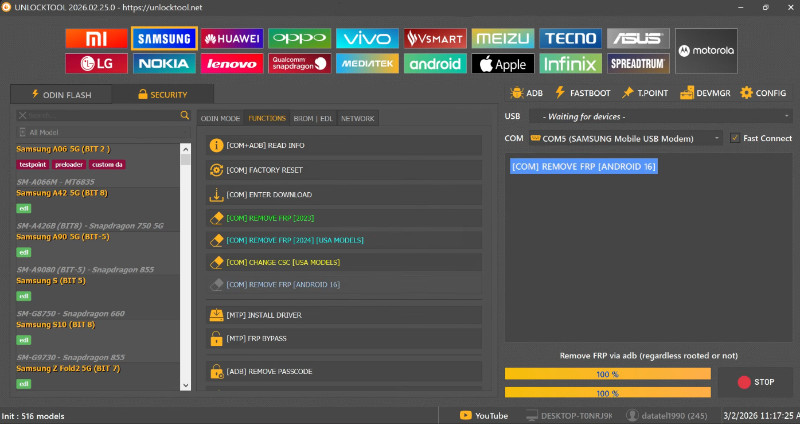
What is UnlockTool?
UnlockTool is a Windows based service platform used by professional mobile technicians to solve software problems on a very large number of phone models. It combines FRP removal, pattern and password reset, bootloader related operations, IMEI related service functions, firmware flashing and device information reading into a single client that communicates with the developer servers. Because the program is account based, new models and new methods are added through regular updates instead of forcing users to download a completely new program every month.
The 2026.09.02.0 release focuses mainly on the Apple side of the toolkit. The update notes published by the developer and repeated by several forums list a fixed one-click Bypass Hello flow for A12 and A13 chips, covering iPhone 11, iPhone 11 Pro, iPhone 11 Pro Max, iPhone SE 2020, iPhone XS, iPhone XR, iPhone XS Max, iPad Air 3, iPad mini 5 and iPad 8. Alongside that fix, the release carries the usual Android improvements: support for new Android devices, additional processor coverage, faster performance and several long standing bugs resolved.
For a repair shop, the value of this update is reliability. Older builds may still open, but the A12 and A13 Hello fix and the added device support remove the need to fall back to a second program during busy hours. The release file for 2026.09.02.0 is identified by the hash bfca7b0edb6c6f692a667f39158d750b, which lets a technician confirm that the copy on the PC matches the official build before running it on a customer phone.
What's New in 2026.09.02.0
- FIXED BYPASS HELLO A12/A13 one-click for iPhone 11, 11 Pro, 11 Pro Max and SE 2020.
- Support for iPhone XS, XR and XS Max plus iPad Air 3, iPad mini 5 and iPad 8 in the same Hello flow.
- New Android device models added across the supported brands list.
- New processor support added for current chipsets used in 2026 devices.
- Several older bugs fixed and overall tool speed improved.
- User interface refinements that make frequently used functions quicker to reach.
Key Features
- Apple Hello and ramdisk services: one-click Bypass Hello for A12/A13 devices with the matching ramdisk, boot DIAG files and video guide published by the developer.
- FRP removal: Google account lock removal for supported Android models through the mode required by each brand.
- Screen lock recovery: pattern, PIN and password reset operations on supported devices.
- Bootloader related operations: unlock and related bootloader functions plus device information reading for diagnostics.
- Firmware operations: flashing and firmware related commands used to recover phones stuck in bootloops or failed updates.
- Server based updates: new models and methods arrive automatically through the client, so the installed version stays current.
- Wide brand coverage: Samsung, Xiaomi, Redmi, Poco, Oppo, Vivo, Realme, Huawei, Honor, Motorola, Nokia, Tecno, Infinix, OnePlus and Lenovo are all handled in one interface.
Supported Devices
On the Apple side, this release explicitly covers the A12 and A13 generation. That includes iPhone XS, XS Max, XR, iPhone 11, 11 Pro and 11 Pro Max, iPhone SE 2020, and the iPad Air 3, iPad mini 5 and iPad 8 tablets. The fix targets the Hello screen state, which is the screen a device shows after a restore or factory reset when activation has not been completed.
On the Android side, UnlockTool supports essentially every mainstream brand found in a repair shop: Samsung, Xiaomi, Redmi, Poco, Oppo, Vivo, Realme, Huawei, Honor, Motorola, Nokia, Tecno, Infinix, OnePlus and Lenovo. The 2026.09.02.0 update adds more of the latest models and processors to that list, which matters when a shop receives a phone that was released only weeks earlier.
As always, individual functions depend on the chipset, the security patch level and whether the workflow needs authorized service access. The tool should be used only on devices the technician is authorized to service, and the exact model number and region variant should be confirmed before any operation is started.
How to Use
- Download the UnlockTool 2026.09.02.0 client from the link below and check that the file hash matches the published release hash.
- Extract the archive, install the Apple and Android USB drivers, and restart the computer so the drivers are loaded.
- Launch the client and sign in with your UnlockTool account; the license and any credits are managed inside the same account.
- Connect the phone or iPhone with a reliable USB cable and let the client detect the device in the correct mode.
- Choose the brand tab, confirm the exact model, then select the required function such as Bypass Hello, FRP removal or flash.
- Follow the on-screen instructions, keep the cable connected, and do not close the client while the operation is running.
- When the progress completes, let the device reboot, then verify the result and check basic functions before returning it to the customer.
Requirements
- Windows 7, 8, 10 or 11 computer.
- 4 GB of RAM minimum and 500 MB of free disk space.
- Working USB port and original data cable.
- Stable internet connection, since the client communicates with the developer servers.
- Apple and Android USB drivers installed before starting.
- A valid UnlockTool account with an active license for premium functions.
- Ramdisk and boot DIAG files downloaded for the Apple workflow when needed.
Download Link
Download UnlockTool 2026.09.02.0 (230 MB, Windows) from the source page: https://tfttool.com/unlocktool-2026-02-25/ — the page contains the installer, the release notes and the requirements. Licenses and the official client are managed by UnlockTool.net, so keep the account active to receive the newest device support through the in-tool update system.
Thanks for reading: UnlockTool 2026.09.02.0 - Apple A12/A13 Hello Fix & Multi-Brand Android Service [Update][2026], Sorry, my English is bad:)