
SamFw Tool 4.9 - Remove Samsung FRP One Click
Today, we are introducing SamFw FRP Tool version 4.9
Main Function:
- Remove FRP with one click
- Change CSC with one click
- Remove FRP for new security patch (Aug 2022)
- Remove FRP paid method
- Remove FRP with one click
How to Use:
- Connect the phone to the PC, and install the Samsung driver if you have not yet installed.
- Go to emergency call then type
*#0*#. - Click Remove FRP on the Tool.
- Click Accept USB debugging on the phone if it appears.
- The phone will finish and reboot after removing FRP.
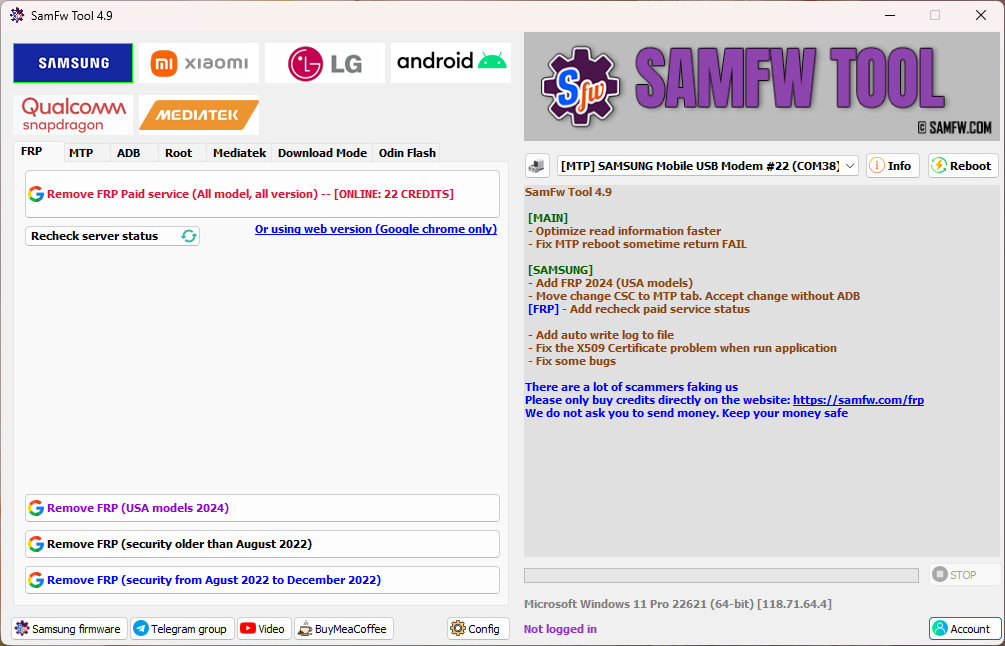
SamFw Tool 4.9
[MAIN]
- Optimize read information faster
- Fix MTP reboot sometime return FAIL
[SAMSUNG]
- Add FRP 2024 (USA models)
- Move change CSC to MTP tab. Accept change without ADB
[FRP]
- Add recheck paid service status
- Add auto write log to file
- Fix the X509 Certificate problem when run application
- Fix some bugs
List of Functions
Samsung
FRP
- Remove FRP
- Remove FRP new security
- Remove FRP 2024 (USA models)
MTP Mode
- Factory reset (Test mode)
- Disable Knox (Test mode)
- Disable Factory mode
- KG Unlock (Untest)
- Factory reset
- Enable secret code for Verizon
ADB Mode
- Change CSC
- Change SN (beta)
- Remove Samsung account (This function works to remove the account in Settings only, not supporting locked state)
- Enable Toggle mobile data (for some AT&T phone)
- Change CSC root mode
Download Mode
- Exit Download mode
- Soft brick Fix
- FRP Android 5/6 (support some models. If you see an error when trying, that means your device is not supported)
Odin Flash
- Save recent flash files
- Auto-detect file and select slot
- Auto-extract for ZIP file
- Ignore MD5 checksum
Misc
- Check Driver signature enforcement status
- Disable/Enable Driver signature enforcement
- Install Samsung USB driver
- Install VC++ 2015 (for ADB works)
Xiaomi
ADB
- Bypass Micloud Android 8.1
- Enable Diag [ROOT]
Fastboot
- [UNLOCKED] Remove FRP
Sideload
- Factory reset
- Remove FRP
- Reset Micloud
- [QUALCOMM] Bypass Micloud clock (Anti relock)
- [QUALCOMM] Remove bypass Micloud clock (Anti relock)
- Read offline Micloud information
EDL 9008
- Factory reset
- Reset FRP
- Reset Micloud
LG
MTP
- Factory reset
EDL (Support LG G7, G8, G8X, G8S, V30, V40, V50, V50S, Q6, G5, G6, V20, V35, V60)
- Factory reset
- Remove FRP
LG UP
- Flash LG KDZ
Android
ADB
- Battery information
- Disable/Enable OTA Update
- Set language
- Factory reset
- Hide Developer options
FRP
- Open Browser (FRP)
- Remove FRP
APP Manager
- Manager applications, remove, disable, enable, clear data single app, multi apps
- Install multi APK/xAPK
- Install any app on Dual Messenger
- Delete bloatware (For Korean, Japan, and US variants)
ROOT
- Remove screen lock (Root)
Qualcomm
EDL 9008 Partitions manager (Read/Write/Erase)
EDL 9008 Reset FRP, Factory reset, Erase userdata
Mediatek
- Factory reset
- Format user data
- Remove FRP
- Unlock bootloader
- Relock bootloader
- Bypass auth
Upcoming Function
- Install XAPK direct
- Install any apps for Samsung dual message
- Disable Factory mode
- [ROOT] Change SN
- [ROOT] Change battery cycle
- [ROOT] View saved wifi password
- MTK module
- Xiaomi sideload solution
Link Download:
Direct link: SamFwToolSetup_v4.9.zip
Warning:
The application uses several tools and scripts to unlock the device and obfuscator to protect the source code so it is suspected to be a virus. This is a false positive. The world's leading anti-virus software such as Kaspersky, Avast, Avira, AVG... all trust and mark the application as safe.
MD5:
99b1e36598e55933e350430519b53b34
Virustotal:
Thanks for reading: SamFw Tool 4.9 - Remove Samsung FRP one click, Sorry, my English is bad:)