
Exynos FRP GSMCode PRO v1.0.0 - Free Samsung Exynos FRP Bypass Tool [2026]
Labels: UnlockTool, Direct Open FRP, Samsung
What is Exynos FRP GSMCode PRO v1.0.0?
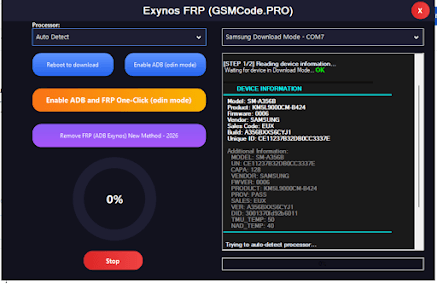
Exynos FRP GSMCode PRO v1.0.0 is a free Windows tool built specifically for Samsung Exynos FRP bypass. It was released in August 2026 and solves a problem many free tools handle awkwardly: on Exynos Samsung devices, FRP removal usually needs ADB enabled first and then a separate bypass step. This tool combines both into one click - you select the Exynos chipset, click Enable ADB and Remove FRP, and the tool handles both operations in one pass through Odin Download Mode.
The tool is developed by GSMCode.PRO. The download page is gsmcode.pro/tools/. The archive password is mobiletechfrp. Because the version is v1.0.0, treat this as an early-but-focused release that solves the Exynos ADB + FRP combination cleanly rather than a mature all-brand suite.
What's New
- One-click Exynos ADB + FRP removal: Enable ADB and remove FRP in a single operation through Odin Download Mode.
- Free for the supported Exynos range: No credits, no activation account, no subscription.
- Focused on older Exynos chipsets: Current v1.0.0 targets Exynos 850 through Exynos 990 range. It does not yet cover the newest Exynos families.
Features
- Free Samsung Exynos FRP bypass with no per-device fee.
- Combined ADB enable + FRP removal in one operation.
- Operates through Odin Download Mode on supported Exynos devices.
- Designed for the Exynos 850 to 990 chipset range.
- Free download from gsmcode.pro/tools/ and from well-known GSM blog mirrors documenting the same v1.0.0 build.
- Includes an Exynos Driver Fix helper for detection issues.
Supported Devices
Confirmed compatibility is for older Exynos chipsets from Exynos 850 through Exynos 990 range, including Samsung Galaxy A, M, Note and S series models on those older Exynos parts.
Newer Exynos chipsets NOT supported in v1.0.0: Exynos 1280 (Galaxy A53, A33), Exynos 1380 (Galaxy A54, A34), Exynos 1480 (Galaxy A55), Exynos 2100 (Galaxy S21), Exynos 2200 (Galaxy S22), Exynos 2400 (Galaxy S24) and Exynos 2500 (Galaxy S25). For those, use a tool that covers the current Exynos range.
The tool supports older firmware versions best. For Samsung Exynos devices on Android 15/16 with recent security patches, a tool with broader current-chipset coverage is usually the better choice.
How to Use / Install
Step 1 - Download: Grab the main tool, Samsung USB Driver v1.9.0.0 and the Exynos Driver Fix from gsmcode.pro/tools/.
Step 2 - Extract: The RAR password is mobiletechfrp. Extract with WinRAR or 7-Zip. Disable real-time antivirus during extraction if it flags the archive.
Step 3 - Install driver: Install Samsung USB Driver v1.9.0.0 or the Exynos Driver Fix. Restart the PC.
Step 4 - Run as administrator: Right-click the tool executable and select Run as Administrator.
Step 5 - One-click Exynos FRP bypass: Put the Samsung device into Odin Download Mode, connect it to the PC, select your Exynos chipset, then click Enable ADB and Remove FRP.
System Requirements
- Windows 7, 8, 8.1, 10 or 11.
- Samsung USB Driver v1.9.0.0 or the Exynos Driver Fix.
- WinRAR or 7-Zip.
- A reliable original USB data cable.
- Administrator rights.
- Internet access only for downloading the package.
FAQ
Is Exynos FRP GSMCode PRO free? Yes, the Exynos FRP function does not require activation credits or a subscription.
Does it work on Snapdragon devices? No - v1.0.0 is built for Exynos chipsets in the 850 to 990 range.
Why chipset not supported? Your device likely uses a newer Exynos chipset (1280 and above) not covered by v1.0.0.
Archive password? mobiletechfrp.
Notes
- This is a new focused tool; the supported list is the real limit.
- Prefer gsmcode.pro/tools/ as the source of truth.
- Use a good USB cable and stable connection.
- Scan extracted files with antivirus before running.
Download Link
Official: gsmcode.pro/tools/ - look for Exynos FRP GSMCode PRO v1.0.0. Package includes the main tool, Samsung USB Driver v1.9.0.0 and the Exynos Driver Fix. Archive password: mobiletechfrp.
Download Exynos FRP GSMCode PRO v1.0.0
Version: 1.0.0 (August 2026)
Developer: GSMCode.PRO
Platform: Windows
Archive password: None (no password required)
| File | Host | Link |
|---|---|---|
| Main Tool | OneDrive | Download |
Thanks for reading: Exynos FRP GSMCode PRO v1.0.0 - Free Samsung Exynos FRP Bypass Tool [2026], Sorry, my English is bad:)