
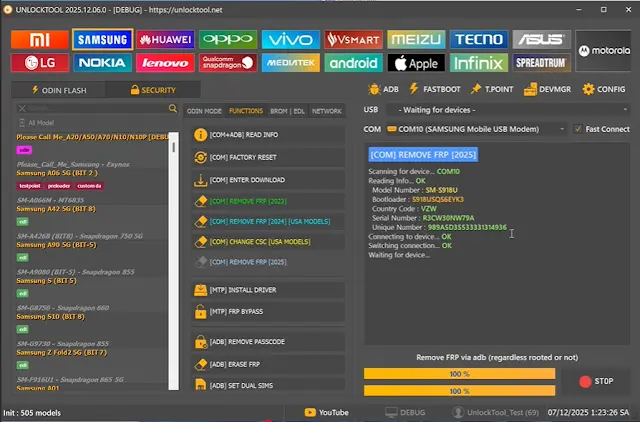
Unlock Tool is a powerful and practical Android service program for Windows that helps technicians and repair shops handle a wide range of GSM problems in one place. This free build lets you remove Google FRP, reset screen locks, flash stock firmware, unlock the bootloader and clean account locks on many popular brands without needing extra hardware boxes.
What is Unlock Tool?
Unlock Tool is a multi-brand Android servicing application designed for FRP removal, flashing and account unlock operations. It works through standard connections and common modes such as ADB, Fastboot, Download mode and EDL, so technicians can service different devices from a single easy interface. This version is shared as a free package.
Key Features
- Google FRP remove across multiple brands and Android versions
- Screen lock / PIN / pattern reset options
- Flash stock ROM and firmware for supported devices
- Bootloader unlock and relock support
- Xiaomi Mi Account bypass and cleaning
- Read device information (model, IMEI, version, serial)
- Factory reset and user data wipe
- Simple tab-based interface for brand selection
Supported Brands
Unlock Tool covers a wide range of Android manufacturers including Samsung, Xiaomi, Redmi, Huawei, Oppo, Vivo, Realme, OnePlus, Tecno, Infinix, Nokia and more MediaTek, Qualcomm and Unisoc based devices.
How to Use
- Download and extract the package to a folder.
- Run the tool as Administrator (important).
- Install the required USB drivers for your device if needed.
- Connect the phone to the PC in the correct mode (ADB / Fastboot / EDL / Download).
- Select the device brand, choose the desired operation and follow the on-screen steps.
Important Notes
- Always take a backup of important data because reset and flashing operations erase user data.
- Disable antivirus temporarily if the tool is blocked during installation; then re-enable it.
- Use the program only on devices you own or have permission to service.
- Results depend on the model, firmware version and connection mode.
Download Unlock Tool (Free)
Get the latest free package of Unlock Tool directly from the official channel:
Download Unlock Tool (unook v1.rar)
File size: about 158 MB. No archive password required—extract and use directly.
Thanks for reading: Unlock Tool v1 - Multibrand Android FRP & Flashing Tool [Free], Sorry, my English is bad:)